
Hi, I'm Bruce. Years ago I paid several thousand dollars to have someone build my official website. The tech was outdated, and the moment a search algorithm update rolled out, my rankings collapsed. All in, that mistake cost me well over a hundred thousand dollars before I finally pulled the plug. That lesson taught me one thing that still guides everything I build today: don't choose a platform because it's "cheap" or "looks cool." Choose it based on whether you can still afford it three years from now, and whether you can actually change it when you need to.
So this isn't a hype piece. This is the Shopify tutorial I wish someone had handed me back then: what it really costs (the monthly fee is just the tip of the iceberg), how to set the store up step by step, how to get payments and shipping working, and exactly when you should walk away and self-host WooCommerce instead. I'll be honest about the weak spots, because I've paid the tuition for getting this wrong.
Quick take: If you don't want to touch code, want to launch fast, and can budget a few hundred dollars a month, Shopify is one of the safest bets out there. If you obsess over every cent, sell very low-priced items, or need deep custom functionality, read the cost section carefully before you commit.
What is Shopify, and is it right for you?
Shopify is a hosted ecommerce platform. In plain English: you pay a monthly fee, and Shopify handles the servers, security, updates, and the checkout plumbing. You just add products, pick a theme, and start selling. There's nothing to install, no hosting to manage, no plugins to keep patched at 2 a.m. That "they handle the boring stuff" promise is the entire reason Shopify exists, and it's why over a million merchants use it.
Here's who I genuinely think Shopify fits:
- You don't want to deal with the technical side
- You want to be live quickly, ideally this week
- You can comfortably budget a few hundred dollars a month
- You're a small-to-mid business selling physical or digital products
And here's who should think twice, because I'd rather you not waste money:
- You're extremely cost-sensitive about every single dollar
- Your average order value is very low (processing fees will eat your margin alive)
- You need heavy custom features that don't exist as off-the-shelf apps
That last group is exactly where I see people get burned. They sign up excited, build a beautiful store, and only at checkout discover that the fees on their $8 product leave them with almost nothing. Margins die at checkout. Keep reading and I'll show you the math.
The full cost of Shopify: the monthly fee is just the iceberg tip
This is the section most "Shopify tutorial" articles skip, and it's the one that actually decides whether you make money. Your true cost is built in four layers, and only the first one is the number Shopify advertises.
Layer 1: The monthly plan (2026 pricing)
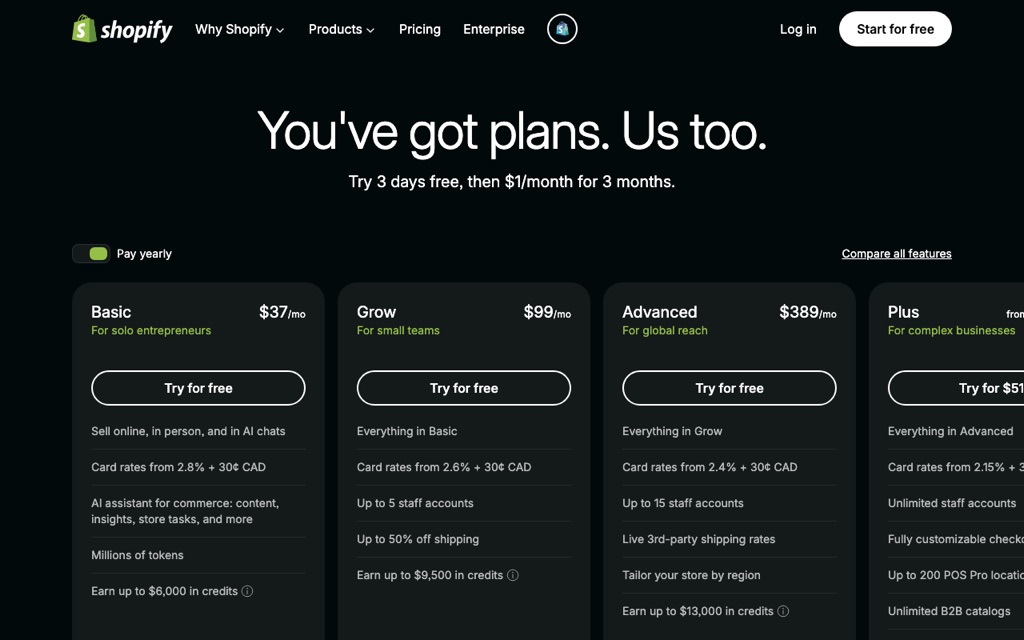
These are the headline plans you'll choose from when you sign up. Pay annually and you'll typically shave around 25% off these monthly numbers.
| Plan | Monthly (paid monthly) | Best for |
|---|---|---|
| Basic | US$39/mo | Just starting out, solo or a tiny team |
| Grow (formerly Shopify) | US$105/mo | Steady revenue, need more staff accounts |
| Advanced | US$399/mo | Larger scale, want advanced reporting |
| Plus | From ~US$2,300/mo | Big brands, high traffic, enterprise needs |
For 95% of people reading this, Basic is where you start. Don't let a salesperson talk you into a higher tier before you have orders to justify it. You can upgrade in two clicks the day you actually need to.
Layer 2: Credit card processing fees
Every time a customer pays, the card networks take a cut, and so does Shopify's payment processor. On the Basic plan in most regions you're looking at roughly 2.9% + 30¢ per online transaction. Higher plans lower that percentage slightly. This is unavoidable on any platform, including WooCommerce, so it's not a Shopify-specific penalty. But it does compound with the next layer.
Layer 3: Third-party transaction fees (the trap nobody warns you about)
Here's the one that quietly drains accounts. If you use Shopify Payments (their built-in processor), there's no extra platform fee on top of the card rate. But the moment you use an external gateway — say PayPal as a primary processor, Stripe directly, or a local provider Shopify Payments doesn't cover in your country — Shopify adds a third-party transaction fee: about 2% on Basic, 1% on Grow, and 0.6% on Advanced.
Why this matters internationally: Shopify Payments is available in around 23 countries (US, UK, Canada, Australia, most of the EU, and more). If you sell from a country where it isn't supported, you're forced onto a third-party gateway, which means you pay both the card rate AND that extra Shopify cut on every single order. Check the Shopify Payments availability list for your country before you fall in love with the platform.
Let me make this concrete, because percentages don't hit until you see real dollars. Say you're on Basic and using an external gateway. On a $100 order, the gateway takes roughly 2.9% (~$2.90), then Shopify takes its 2% third-party fee (~$2.00). That's nearly 5% of every order gone to payment costs alone — before shipping, before ad spend, before product cost. On a $100 sale you might think you're fine. On a $12 sale, that math is brutal.
Layer 4: App costs (the slow leak)
Shopify's core is lean by design. Want abandoned-cart emails, advanced reviews, upsells, subscriptions, or a specific shipping rule? Most of those come from the App Store, and the good ones are paid — often $10 to $50/month each. Install four or five "must-have" apps and you've quietly added $100+/month to your bill without changing your plan.
None of these layers are dealbreakers. But add them up and a "$39/month" store can realistically run $150–$250/month once it's actually selling. Budget for the whole iceberg, not just the tip.
Step-by-step Shopify setup (just follow along)
Enough theory. Here's the part where you actually build something. The whole point of Shopify is that this is genuinely easy, so let's prove it.
Step 1: Sign up with the free trial
Start with the free trial. You don't need a credit card to build the store, and you can construct the entire thing — theme, products, checkout — before you ever pay. This is the single best way to find out if Shopify fits you, because you'll experience the real workflow instead of reading about it.
Step 2: Pick a theme
Once you're in, head to Online Store → Themes. Shopify ships with a clean free theme called Dawn that's honestly good enough to launch with — I've seen six-figure stores running it. The paid themes (typically a one-time ~$100–$400) buy you more layout options and built-in features, not necessarily more sales. My advice: launch on a free theme, get real orders, then upgrade if you hit a wall. Don't spend day one agonizing over fonts.
Step 3: Add your products
Go to Products → Add product. For each item, fill in:
- Title and description (work your keywords in naturally)
- Images (at least 3–5; a clean white-background main shot converts best)
- Price and cost (the cost field feeds your profit reporting)
- Inventory and SKU
- Shipping (mark it as a physical product and enter the weight — this powers accurate shipping rates later)
That's the core loop. Repeat it for your catalog and you have a functioning store. Everything after this is refinement.
Connecting payments: the part that actually makes or breaks you
This is the most important section in the whole guide, so don't skim it. I've watched too many people build a gorgeous store and then hit a wall at checkout because they never thought about payments until the end. Payments are not a step-three afterthought — they're a day-one decision.
If Shopify Payments is available in your country
Lucky you — take it. Go to Settings → Payments and activate Shopify Payments. You get card processing with no extra third-party transaction fee, and in many markets it unlocks Apple Pay, Google Pay, and Shop Pay out of the box, which measurably lifts conversion. This is the cleanest, cheapest path, and it's why checking your country's eligibility before signing up matters so much.
If Shopify Payments is NOT available where you sell
Then you're connecting an external gateway, and you'll pay that third-party fee from Layer 3. The most common international options are PayPal (near-universal coverage and high buyer trust), Stripe via a third-party connector, and regional processors that fit your local buyers. Here's a rough comparison of what international sellers typically reach for:
| Gateway | Card rate (approx.) | Why pick it | Shopify third-party fee? |
|---|---|---|---|
| Shopify Payments | ~2.9% + 30¢ | Native, unlocks Apple/Google/Shop Pay, best conversion | No (cheapest path) |
| PayPal | ~2.9% + fixed fee | Trusted worldwide, fast to enable, great for cross-border | Yes, if used as primary gateway |
| Stripe (via connector) | ~2.9% + 30¢ | Smooth on-site checkout, strong developer tooling | Yes |
| Local/regional processor | Varies by region | Supports local cards and payment habits buyers expect | Yes |
Reality check for cross-border sellers: Local payment habits win sales. Shoppers in some markets distrust cards and expect bank transfers, wallets, or cash-on-delivery. If you're selling into a region where Shopify Payments doesn't reach, budget for a local gateway plus that extra Shopify fee — and price your products knowing payment costs can approach 5% per order. Going in with eyes open beats discovering it after your first sales report.
Shipping and rates setup
Head to Settings → Shipping and delivery. The two approaches most beginners use are flat rate (one simple price, easy to communicate) and weight- or carrier-calculated rates (Shopify pulls live prices from carriers based on the product weights you entered earlier). My honest recommendation for new stores: start with a simple flat rate or free shipping baked into your price. It's predictable, it converts better, and it spares you from over-engineering logistics before you have volume. You can layer in carrier-calculated rates once orders are flowing and you understand your real shipping costs.
After launch: don't ignore SEO and marketing
Here's the part I learned the hardest way. A pretty store with no traffic is just an expensive hobby. After my own site cratered on a single algorithm update, the lesson — paid for with that six-figure tuition — was this: never depend on one traffic source. Build a few channels so no single update can wipe you out.
The basics, in order of effort-to-payoff:
- Work keywords into product titles and descriptions naturally
- Edit the SEO title and meta description for each product and page
- Add alt text to every image
- Connect Google Search Console so you can see what people actually search to find you
- Run a blog or content section — it's slow, but it compounds and it's traffic you own
Paid ads rent you attention. SEO and content let you own it. After watching one algorithm update erase years of work, I'll never bet a business on a single channel again.
Shopify vs self-hosted WooCommerce: the one-line verdict
This is the question I get most, so here's the honest side-by-side before I give you the one-liner.
| Comparison | Shopify | Self-hosted WooCommerce |
|---|---|---|
| Ease of use | Low effort, works out of the box | Medium-high, you build the site yourself |
| Monthly cost | Plan + fees + apps; higher but fixed and predictable | Starts at hosting cost; lower but you maintain it |
| Payment freedom | Limited; extra fee if you can't use Shopify Payments | High; plug in any gateway plugin, no platform cut |
| Maintenance | Shopify handles everything | You carry it all (updates, backups, security) |
So here's the verdict in one sentence: if you hate hassle, want to launch fast, and are happy to pay a monthly fee for peace of mind, choose Shopify; if you want to minimize long-term cost, need deep customization and total payment freedom, and don't mind handling your own hosting and maintenance, self-host WooCommerce instead.
Neither is "better" in a vacuum — they're tools for different temperaments and budgets. If the WooCommerce route sounds like you, I've written a full walkthrough for it: how to build a WordPress website with WooCommerce. Read both, then pick the one you can actually live with for three years.
Conclusion: try it free, sort out payments, then commit
If you take one thing from this guide, make it this: the monthly plan is the smallest part of your real cost, and payments are the decision that quietly determines whether you turn a profit. Figure out your payment setup and your true per-order fees before you sink money in — that single step would have saved a lot of the people I've watched stumble.
And don't just theorize in your head. The fastest way to know whether Shopify is right for you is to build a store for real. The free trial lets you set up the whole thing — theme, products, checkout — without paying a cent. Spend an afternoon actually building it, and you'll learn more than reading ten tutorials, including this one.